
What Is PV Module Barcode Scanning and Why Utility-Scale Projects Need It
What is PV module barcode scanning? See how utility-scale solar teams use it for module traceability, warranty tracking, and faster handover.

Karthik Mekala
CMO
Published on
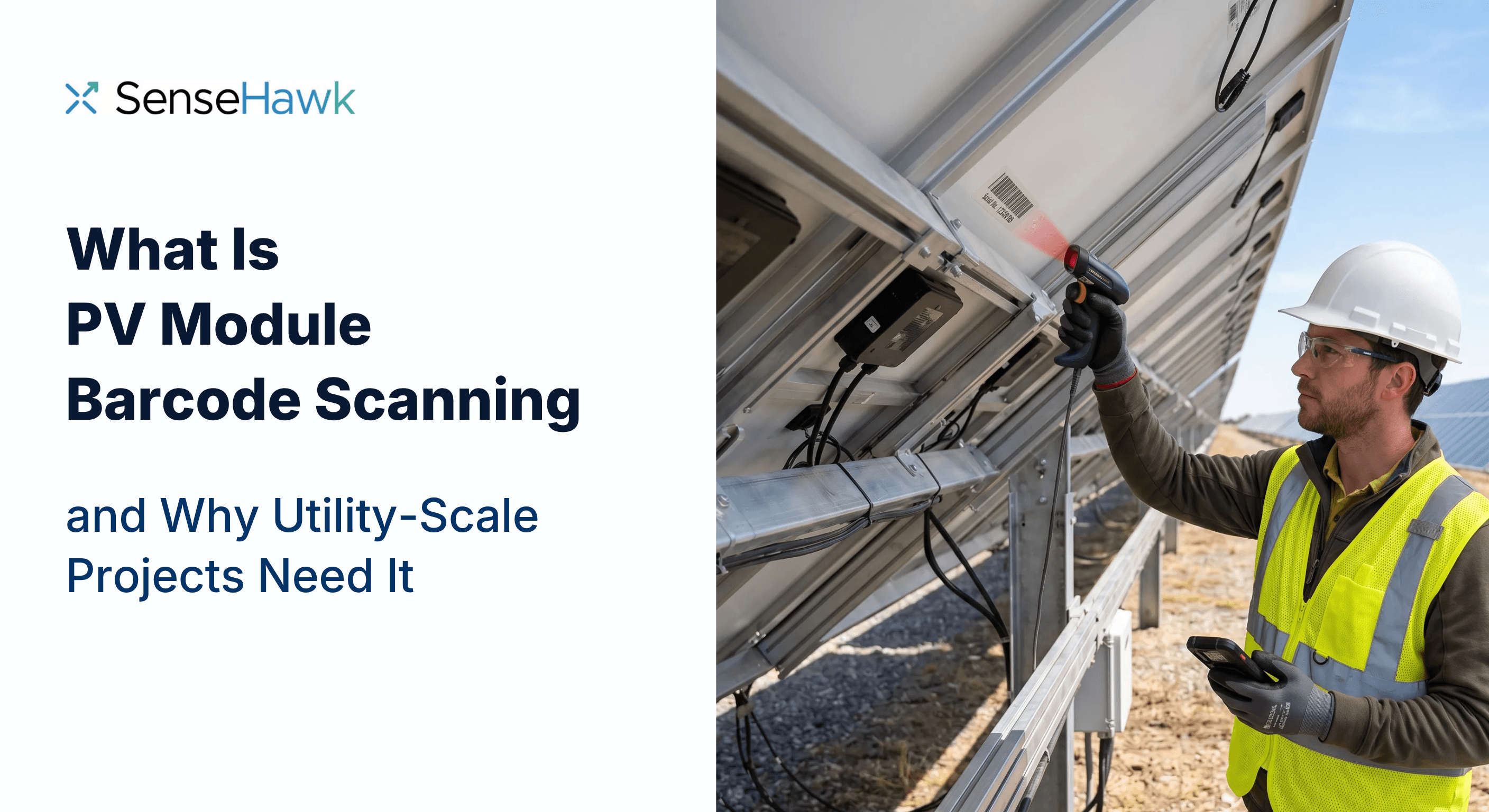
What is PV module barcode scanning? See how utility-scale solar teams use it for module traceability, warranty tracking, and faster handover.
Karthik Mekala
CMO
Published on
A single utility-scale solar project can involve hundreds of thousands of PV modules. On larger builds, the number runs into the millions.
Every one of those modules carries a unique serial number, and it is the only thing that distinguishes one module from the identical module next to it.
Tracking those numbers by pallet gets a project to block level and no further. Nothing in that chain records where an individual module ended up, and gaps open up between the stages that need to reference the same data:
Field installation
QA/QC inspections
Commissioning
Final handover
Long-term asset management
PV module barcode scanning closes those gaps. It captures module identification data digitally against the position the module actually occupies, and connects each physical module to its quality records and lifecycle documentation. Module serialization stops being a manufacturing detail and becomes the backbone of PV module traceability across the whole project. Instead of several disconnected lists, the project ends up with one equipment record inside its solar construction management data, carrying from installation through to the O&M team.
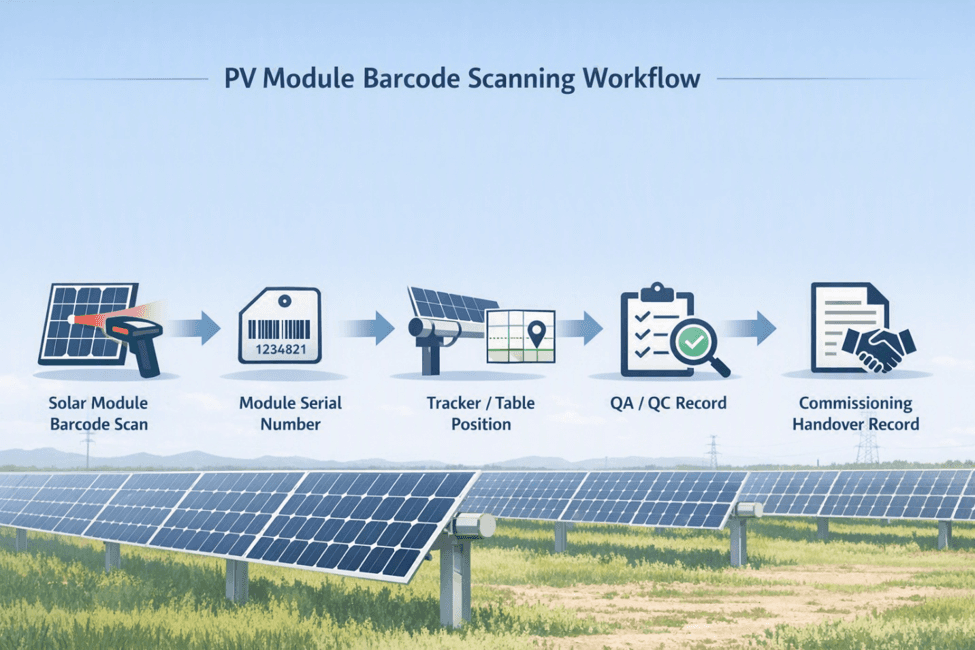
PV module barcode scanning is the practice of using a handheld scanner or mobile device to read the barcode on each solar module and record its serial number digitally, linked to the module’s physical location and installation status.
Rather than inferring location from which pallet went to which block, field teams scan the label directly into a project system, creating a traceable record for every module on site. Module serial number scanning is what moves the record from block level to table level.
The value is in what gets captured alongside the number. Each scan event ties together:
Module serial number, read from the 1D or 2D barcode on the module label
Tracker ID, identifying which tracker or table the module belongs to
Module position, the specific slot within that tracker or string
Scan date and time, timestamped automatically at the moment of capture
Operator, the user who captured the scan
In practice, most EPCs run this as a dedicated exercise, with scanning teams working through the site block by block once modules are up. Coverage across a large site is rarely reliable, so capture needs to work offline and sync when the crew is back in range. The scan is what produces a position for each serial number.
Each module is associated with the relevant block, table, row, string, or map location. This is where module installation tracking and digital twin module tracking converge, and it is the step that turns a serial number list into a usable as-built record.
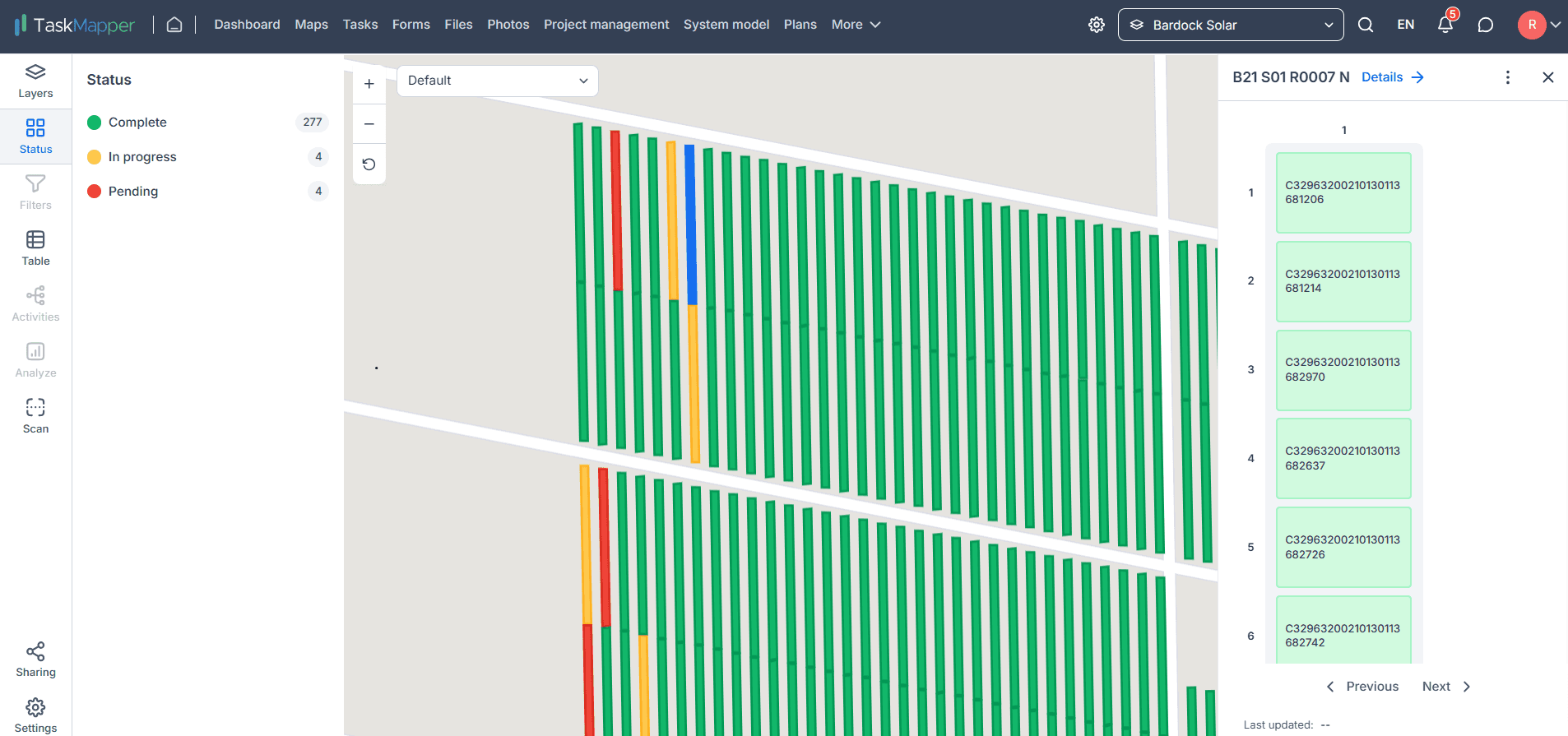
Scans accumulate against the project’s system model rather than into a standalone file, organized by tracker and module position. Serialized component tracking at this level means each module is an individual record that can be queried and reported on, instead of a line in a count. Solar module serial number tracking becomes a question you ask the model rather than a search through files.
Inspection results, photos, defects, and NCRs are attached to the module, which puts QA/QC records on the same identifier as the installation record. When an inspector raises a torque issue, cracked glass, or a wiring non-conformance, the finding is filed against a specific serialized module rather than a free-text location description.
Damage logged during the scan forms the list of modules that need replacing, which goes out for remediation. When a new module goes in, its serial number is recorded against the same position.
Creating a complete record of installed modules before handover is one of the main reasons the scan happens at all. Solar project handover stops being a document assembly exercise: commissioning teams work from a populated as-built rather than reconstructing one, and the owner receives handover documentation that the O&M team can query on day one.
Most projects work from the supplier’s pallet lists, mapping them to blocks as construction proceeds. That is a reasonable approach, and it has a ceiling: it can tell you which block a module is probably in, and never which table.
Parameter | Manual tracking | PV module barcode scanning |
|---|---|---|
Data entry method | Supplier spreadsheets of serial numbers by pallet, manually mapped to blocks | Barcode read directly into a mobile device against its position |
Risk of error | Mapping error. Tracking which pallet went where is difficult on an active site | Low. The number is read straight from the label into the record |
Traceability to tracker or position | Block level at best. The pallet list shows the block, not the table | Exact table and module position recorded with every scan |
Handover readiness | Records are compiled at the end, often reconstructed under schedule pressure | Records accumulate as construction proceeds and export on demand |
Availability of module records for warranty documentation | Partial, and often assembled after the fact | Complete serial-to-position record, available for the life of the asset |
Traceability is about answering specific questions. Which batch did this module come from? Where exactly is it? Has it been inspected? Was a defect ever raised against it? Scanning makes each of those answerable for any module on the project, because the serial number is the key that every subsequent record hangs off. It is end-to-end material traceability applied to the highest-count component on site.
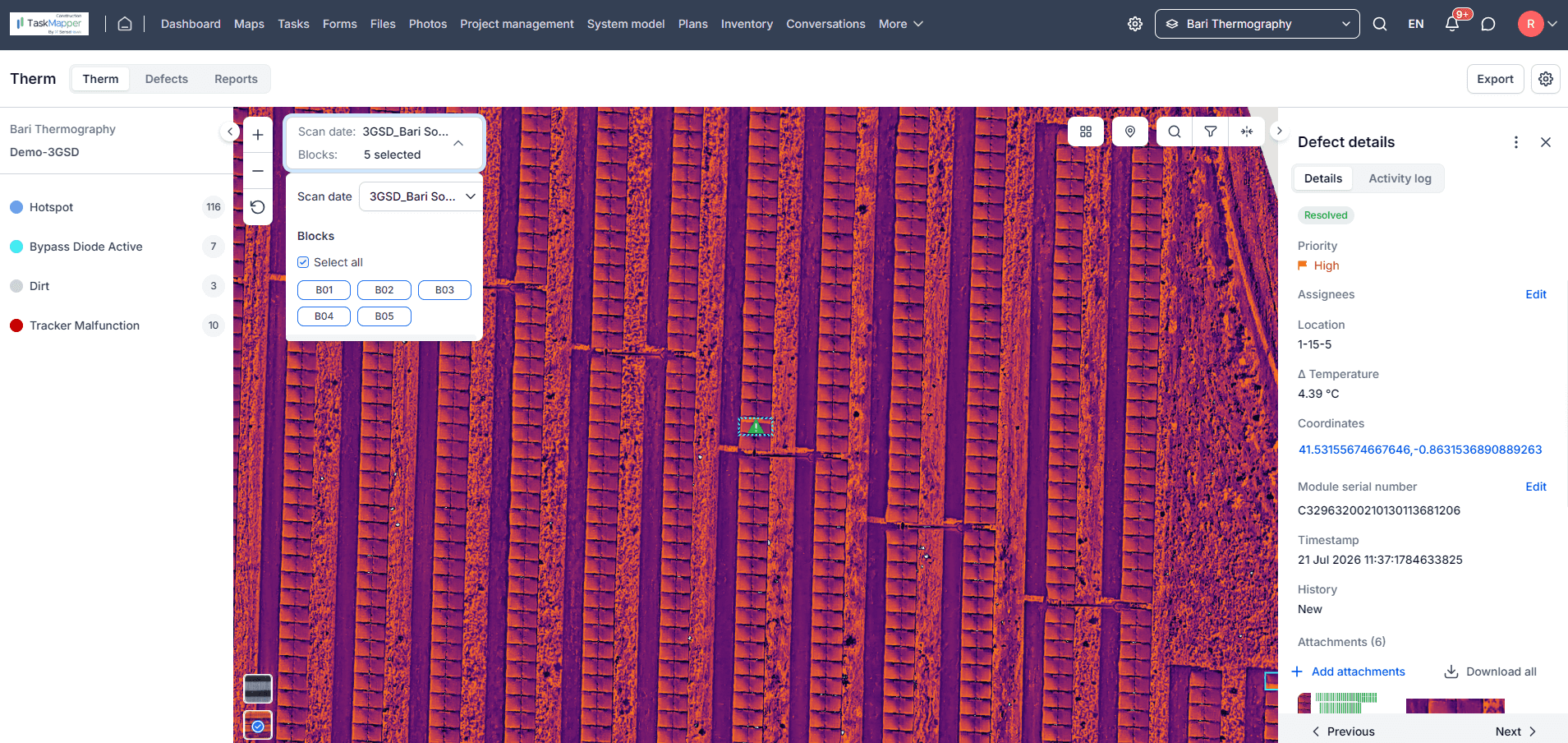
A project can reach commissioning to find that the number of modules the record accounts for and the number actually on the trackers do not agree. The difference gets attributed to breakage, replacement, or miscounting, usually without evidence for any of them. When every installed module is scanned against its position, a discrepancy points to a specific set of positions rather than a total that is off by some amount, so it can be walked and resolved instead of estimated.
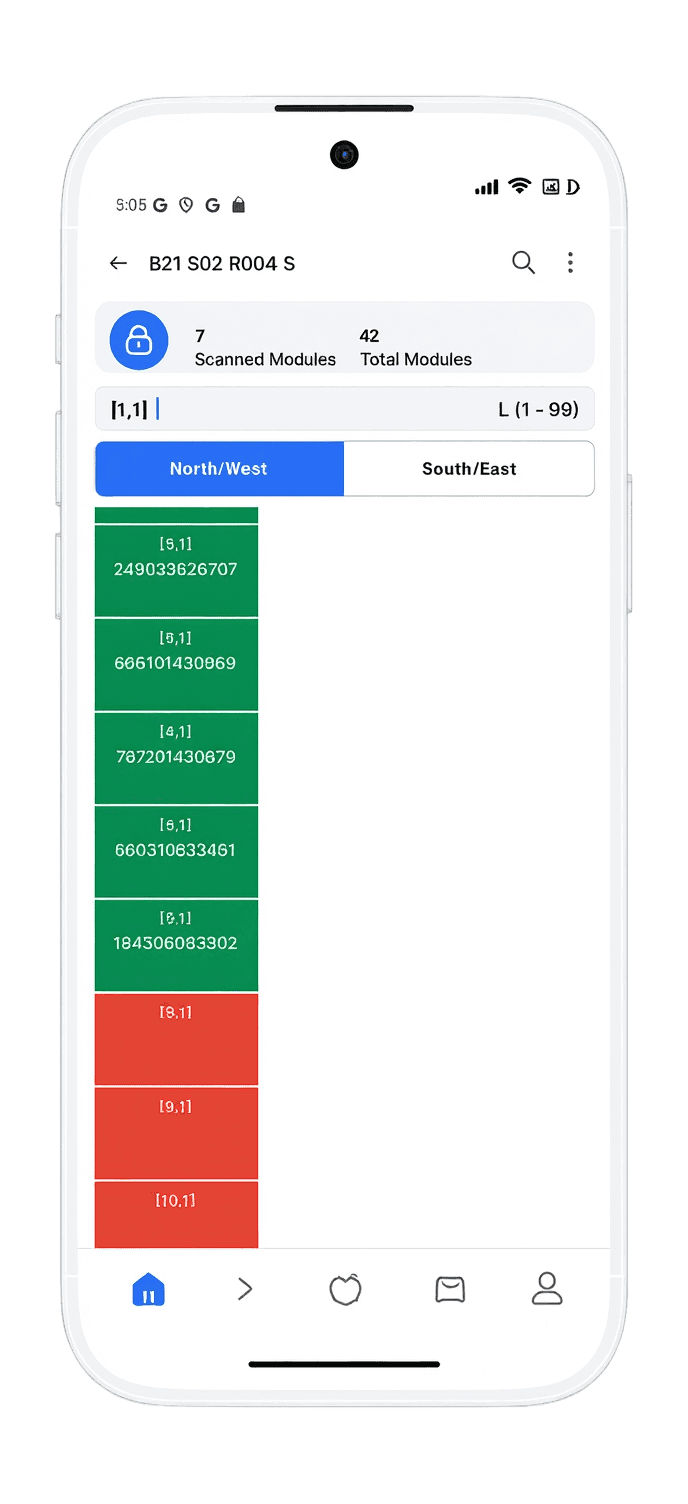
Knowing exactly which module sits in which position becomes more valuable as project scale increases. No amount of local knowledge closes the gap between a block-level list and a table-level one, and on a site built across multiple phases by multiple subcontractors there is nobody who could. The scanned record is the only version of it, and it also serves as the as-built reference for anything that comes afterward, including layout validation and performance investigation.
An inspection finding logged as “cracked glass, Block 4, north end” requires someone to go and find it. The same finding logged against a serialized module, with a photo attached and a position in the digital twin, can be assigned, located, and closed without a search. Linking issues directly to serialized equipment also makes patterns visible, because defects that cluster in one batch or one crew’s work show up as a batch or crew, rather than as a set of unrelated tickets.
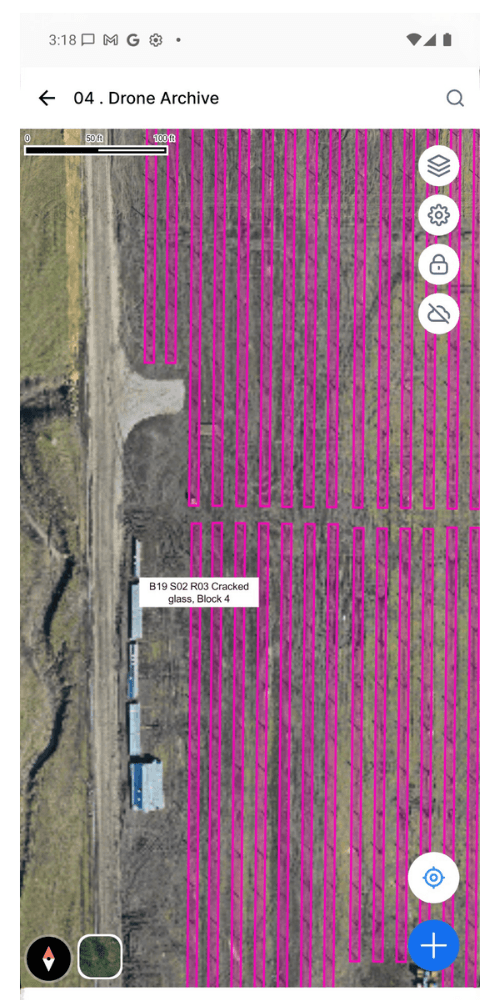
Commissioning is where undocumented construction gets discovered. Teams that reach mechanical completion without a module-level record have to assemble one, and the version they deliver is a best reconstruction rather than a capture. Delivering organized, equipment-linked documentation to owners and operations teams shortens closeout, reduces punch list churn on documentation items, and gives the operations team records they can use rather than records they have to file. Commissioning benefits most directly, because so much of it is evidence collection.
Warranty coverage outlasts the tenure of anyone involved in construction. A record 647 GW of new solar capacity was added worldwide in 2025, according to Ember, so the number of modules moving into operations grows every year.
When a module fails or a string underperforms, the manufacturer will ask for the serial number, proof of purchase, details of the installation, and usually photographs of the defect. The position is what lets you connect a failing serial number to a physical module on site, and send someone to it.
A project handed over with a full serial-to-position record removes the discovery phase from every future claim, replacement, and maintenance investigation. That is the practical purpose of an as-commissioned record: a life-long reference that makes a warranty claim a lookup rather than an investigation.
Some project owners require the EPC to hand over exact serial number locations by table, which is not something a pallet list can produce. That requirement is what usually brings scanning software onto a project, and the owner sees the return later, when warranty claims and O&M traceability are straightforward instead of investigative.
A scan is only as useful as what it lands in. Captured into a standalone app, disconnected from the layout and the inspections, it is still an isolated list. It has to sit alongside the layout, the tasks, and the documentation to be worth anything later.
That is the role barcode scanning plays in TaskMapper. The scanning feature itself covers capture, hierarchy, and export, and the wider platform supplies the project context the scans land in:
Mobile field data capture. Mobile field data collection happens on site rather than back in an office. Field teams scan module serial numbers using Android handheld devices with integrated 1D and 2D barcode scanners, with offline capability for sites without reliable connectivity.
Serialized component tracking. Each scanned module exists as an individual record rather than a line in a count, so it can be referenced, queried, and reported on individually.
Equipment-level traceability. Scanned data flows into TaskMapper’s relational system hierarchy, organized by tracker and module position.
Map-based project records. The wider TaskMapper platform carries the project site on an interactive map, so a scanned module’s position is something teams can see in context rather than read off a list.
QA/QC workflows. Digitized ITPs, NCRs and corrective actions run against the same digital twin the scans populate, which is what allows a finding to be filed against a specific module and tracked to closure. Quality management and scanning share one data model rather than two.
Photos and documentation linked to assets. Geo-tagged forms, photos, and field evidence attach to the asset record instead of living in a shared drive folder.
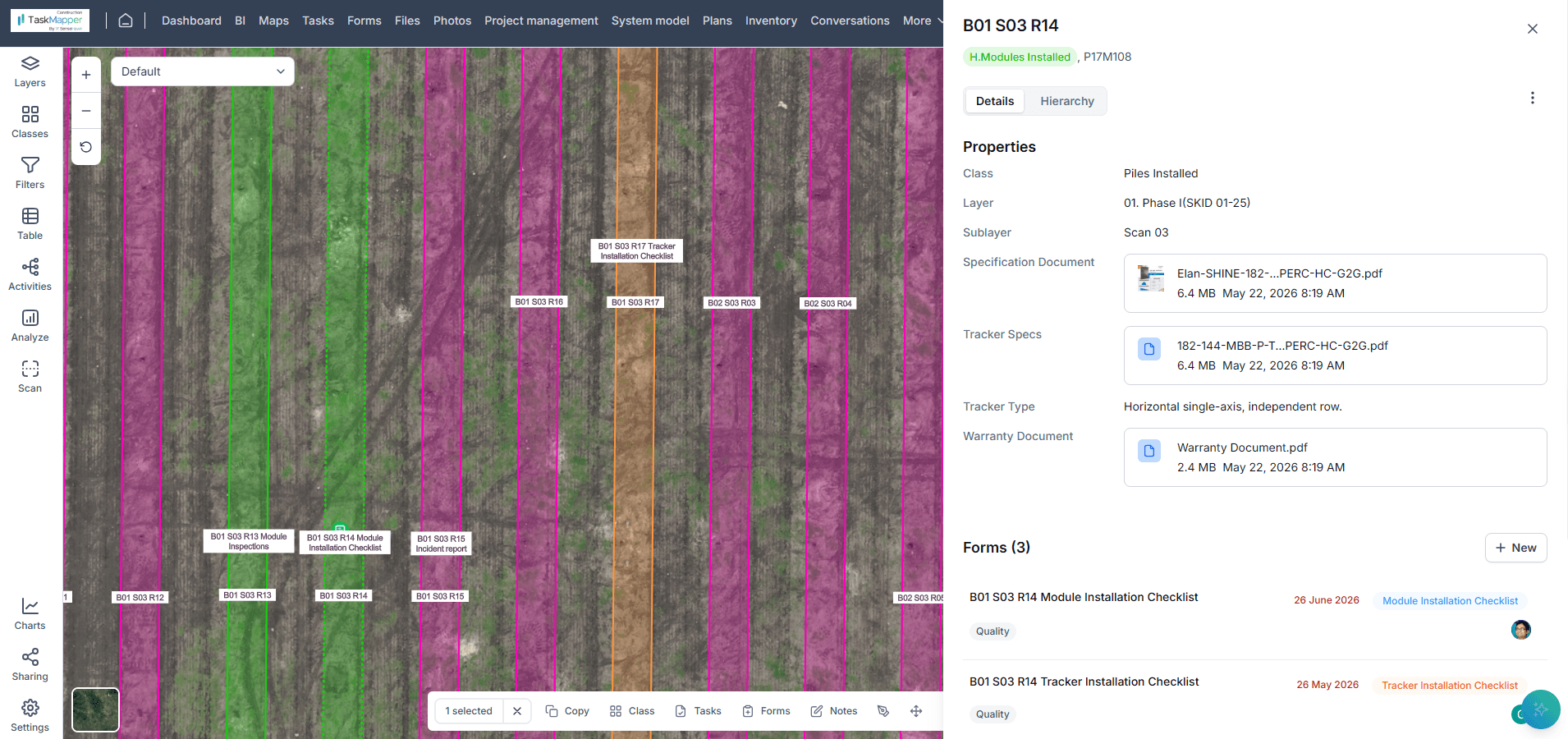
Construction-to-handover data continuity. Commissioning workflows already tie testing, as-built documentation and handover records back to the digital twin, so module records feed the audit-ready closeout package rather than a separate exercise. Serial number records export as CSV for client submission without manual reconstruction.
Teams planning to introduce the workflow should treat it as a data standard, not a device purchase. The following sequence keeps scanning useful at scale:
Select scanning devices based on barcode type, field conditions, and project requirements. Confirm which formats the OEM uses across all supplying factories, and check that the hardware handles dust, glare, gloves, temperature, and full-shift battery life.
Establish module and location data standards before large-scale installation begins. Agree on how blocks, tables, rows, strings, and module positions will be named and numbered, and use the same naming everywhere. Renaming after 100,000 scans is expensive.
Connect scanning workflows with the project’s digital twin or system model from the beginning. The hierarchy that scans attach to should already exist when scanning starts, so scans land in position rather than waiting to be mapped later.
Define what triggers a scan. The main scanning pass is one trigger. The other is replacement: modules get swapped during construction, and a position scanned once can end up holding a different module. Agree both up front, or the record goes out of date without anyone noticing.
Train field teams on consistent scanning and data validation procedures. Cover what to do when a label will not read and when a scan is rejected. Consistency across crews matters more than speed.
Check the captured data as you go. Review scan coverage against the layout at regular intervals, so missing positions surface while crews are still on that block rather than at closeout.
Maintain equipment-linked QA/QC and installation records throughout construction. Keep inspections, photos, and NCRs attached to the serialized module as work proceeds, so the record stays current.
Prepare structured, contract-ready records for commissioning and final handover. Confirm the required format and content with the owner early, and check the export against it well before mechanical completion.
What is a PV module barcode used for?
It encodes the module’s unique serial number. On a project that number is used to record which module was installed where, attach inspection findings to a specific unit, and support warranty claims and replacements later in the asset’s life.
Is barcode scanning required for compliance programs like DCR or ITC eligibility?
Scanning itself is generally not mandated, though the serial-level evidence it produces often is. In the US, PV module serial numbers are commonly used to substantiate ITC and safe harbor positions. In India, modules that cannot be verified on the DCR Verification Portal have not been accepted under major government programs since December 1, 2024, according to MNRE. Requirements vary, so confirm the evidence standard for your program.
Can barcode scanning read damaged or faded module labels?
Usually yes. Modern scanners cope with glare, low light, and partial obstruction, and a soiled label can often still be read. A torn or heavily contaminated label may fail, so build in an exception path: manual entry with a supervisor check and a photo as evidence.
What hardware do field teams need for PV module barcode scanning?
A device that reads the barcode formats your module supplier uses, and an app that writes each scan into the project record with its position. In practice a solar panel barcode scanner on a utility-scale site is a rugged Android handheld with an integrated 1D and 2D reader. Offline operation and full-shift battery life matter more than raw scan speed.
Tracking those numbers by pallet gets a project to block level and no further. Nothing in that chain records where an individual module ended up.
Karthik Mekala
CMO