Wind Turbine Inspection Software: Features, Benefits and How to Choose the Right Platform
Learn how wind turbine inspection software connects drone imagery, defect tracking, and inspection history to each turbine. Compare features and choose the right platform.
Karthik Mekala
CMO
Published on
Wind turbine inspections still run on a mix of paper punch lists, phone photos, and drone footage that gets reviewed once and then filed away. The inspection happens, a defect gets noted somewhere, and then the trail often goes cold until someone remembers to follow up, or doesn't. This is exactly the gap wind turbine inspection software is built to close.
Inspections are already happening on most sites. The real issue is that the data from them rarely connects back to the specific turbine or component it was taken from, which makes it hard to track a defect from first sighting to actual repair.
What Is Wind Turbine Inspection Software?
Wind turbine inspection software is a system that connects drone imagery, defect logs, and inspection history directly to each turbine and its components, so inspection findings turn into trackable, closeable work instead of a folder of photos.
Instead of an inspection producing a report that lives on its own, the findings, images, and any follow-up work stay tied to the asset they came from.
What Does It Replace
Paper punch lists and manually compiled inspection reports
Drone photos and scans stored separately from the turbine or component they document
Defect follow-up tracked informally or not tracked at all once the inspection is filed
In place of these, wind turbine inspection software keeps every finding attached to the asset record it belongs to.
Key Features to Look for in Wind Turbine Inspection Software
Not every platform that handles drone footage is built for inspection workflows. These are the features that actually make inspection data usable.
Drone & Aerial Blade Inspection Integration
High-resolution wind turbine drone inspection imagery and structural scan results should tether directly to the specific turbine component's visual timeline, not sit in a separate folder that someone has to manually match back to the right asset.
AI-Driven Damage Detection
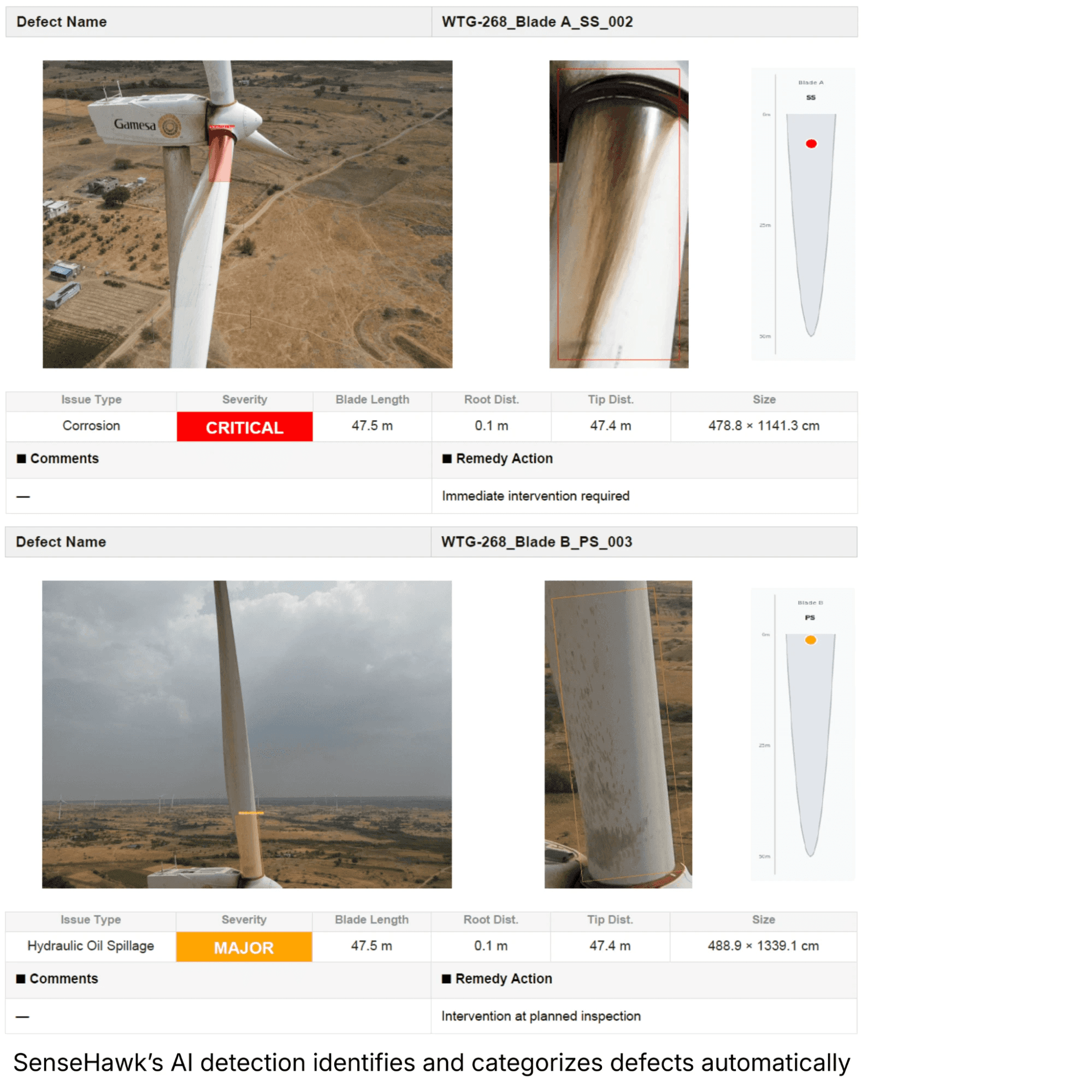
Applying AI-driven analysis to drone imagery to identify damage on blades and nacelles cuts down on how much a human reviewer has to catch by eye alone, especially across a large fleet where manual review doesn't scale.
GIS-Tied Inspection Records
Map-based visualization ties inspection findings to the exact turbine location, so teams can see where issues are concentrated across a site instead of working through a flat list of asset IDs.
Component-Level Inspection History
Good blade inspection software tracks serialized components, blades, nacelles, tower sections, individually, rather than logging every finding against the turbine as a whole. That makes it possible to see a specific blade's condition over time, not just the turbine's.
Mobile Field Inspection Capture
Field crews need to log inspections, defects, and QA/QC forms directly from site, with geo-tagged photos, even where connectivity is unreliable. An offline-capable mobile app keeps that data accurate without requiring a stable signal.
Digitized Punch Lists and Defect Closure Tracking
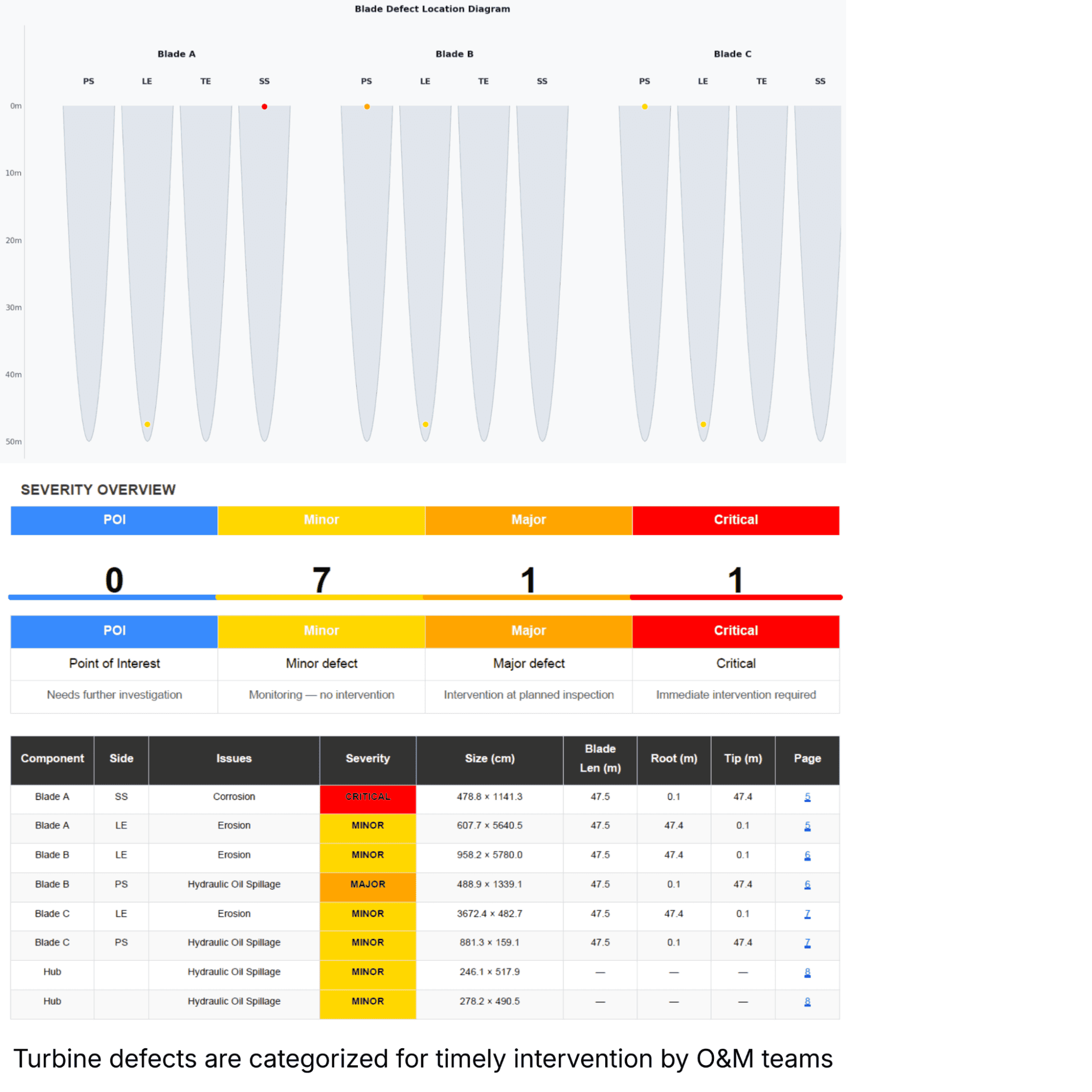
Wind turbine defect tracking works best when punch lists are digitized to geotag defects, assign follow-up tasks, and track closure, turning an inspection finding into a piece of work someone is accountable for, instead of a note that may or may not get acted on.
Benefits of Using Wind Turbine Inspection Software
Connecting inspection data to the asset it came from changes how quickly teams can act on what an inspection actually found.
Catch Damage Earlier
AI-assisted review of drone imagery can flag blade and nacelle damage that would otherwise depend on a human catching it during a manual pass.
Close the Loop on Defects
When a defect is logged with an assigned owner and tracked to closure, it's far less likely to get lost between the inspection and the repair.
See Inspection Status Across the Whole Site
A map-based view of inspection and work status makes it possible to see where a large site actually stands, not just what one inspector covered.
Build a Real History Per Component
Component-level inspection history means a blade or nacelle's condition can be tracked over multiple inspections, not just captured as a one-off snapshot.
Reduce Time Spent Reconciling Field Data
When geo-tagged photos and QA/QC forms sync automatically from the field, teams spend less time matching paperwork to the right turbine after the fact.
Manual Inspection vs. Software-Driven Inspection
The difference between running inspections on paper and running them through a connected system shows up across several practical measures:
Parameter
Manual / Paper-Based Inspection
Software-Driven Inspection
Defect capture
Paper punch lists, photos saved locally by whoever inspected
Geo-tagged photos and defects logged directly against the asset
Damage detection
Depends on the inspector spotting it during a manual review
AI-driven analysis flags damage in drone imagery automatically
Data location
Scattered across inspector laptops, emails, and shared drives
Centralized against each turbine's inspection history
Defect tracking
Follow-up often tracked in a separate spreadsheet or not at all
Digitized punch lists with assignment and closure tracking
Site awareness
Hard to see where inspections stand across a large site
Map-based visual status by turbine and work stage
Auditability
Inconsistent, paper or photo records hard to retrieve later
Time-stamped, retrievable inspection records per asset
How to Choose the Right Wind Turbine Inspection Software
A few practical checks make it easier to tell genuine wind turbine inspection software from a drone data viewer with an inspection label on it:
Drone data integration: Confirm the platform can ingest imagery and scan results directly and tie them to specific turbine components, not just store them as unlabeled files.
AI-assisted damage detection: Check whether the platform can flag likely damage in imagery automatically, or whether every image still needs a manual review.
GIS/mapping capability: Look for a map-based view that connects inspection findings to turbine locations across the site.
Offline mobile capture: Field crews need to log inspections and defects without a reliable connection, so offline support in the mobile app matters for remote sites.
Defect assignment and closure tracking: Make sure a logged defect can be assigned, tracked, and closed, not just recorded.
Component-level history: Verify inspection findings attach to the specific component, not only the turbine as a whole.
Portfolio scalability: Make sure the wind farm inspection software holds up across multiple sites and turbine models, not just a single project.
How SenseHawk Supports Wind Turbine Inspection
SenseHawk's wind platform ties drone-based blade and tower inspection directly into the turbine's digital twin, so inspection findings connect to the asset they came from rather than sitting in a separate imagery archive.
Drone Blade & Tower QC Hub
High-resolution aerial inspection imagery and structural scan results tether directly to the specific turbine component's visual timeline.
AI-Assisted Damage Identification
AI-driven analysis is applied to drone imagery to help identify damage on blades and nacelles.
Map-Based Site Visibility
GIS ties turbine locations and field activity to a spatial view of the project, with turbine status visible by work stage across the site.
Digitized Punch Lists
Punch lists are digitized to geotag defects, assign tasks, and track closure, rather than relying on paper forms.
Offline-Capable Mobile Field Capture
Field crews can capture geo-tagged photos, complete QA/QC forms, and submit daily field updates directly from site, without needing a stable connection.
It's software that connects drone imagery, defect logs, and inspection findings directly to a turbine and its components, so inspection data turns into trackable work instead of a standalone report.
How does AI help with wind turbine inspections?
AI-driven analysis can be applied to drone imagery to help flag likely damage on blades and nacelles, reducing how much a human reviewer has to catch through manual review alone.
Can inspection software track defects to closure?
Yes. Digitized punch lists let teams geotag defects, assign them to someone, and track them through to closure, rather than relying on a report that isn't followed up on.
Does wind turbine inspection software work offline in the field?
Platforms built for remote sites offer offline-capable mobile apps, so crews can capture geo-tagged photos and complete inspection forms without a reliable connection, syncing once they're back online.
Can inspection findings be tracked at the component level, not just the turbine?
Yes. Serialized components such as blades, nacelles, and tower sections can carry their own inspection history, so a specific component's condition can be tracked over multiple inspections rather than only being logged against the turbine as a whole.
Inspections are already happening on most sites. The real issue is that the data from them rarely connects back to the specific turbine or component it was taken from, which makes it hard to track a defect from first sighting to actual repair.